
Bulk purchasing should be simple, structured, and scalable. On Pollen Direct Marketplace, buyers can place bulk offers using two flexible methods: Direct Bulk Order inside the platform or Offer via Excel for larger transactions.
Whether you're buying in cartons or units, Pollen gives you the flexibility to manage volume efficiently. Why Bulk Ordering on Pollen Works Better
Pollen’s bulk offer system is designed to:
Simplify high-volume purchasing
Allow selection by cartons or units
Display minimum order quantities clearly
Reduce manual back-and-forth communication
Speed up decision-making across multiple SKUs
Let’s walk through the two available methods.
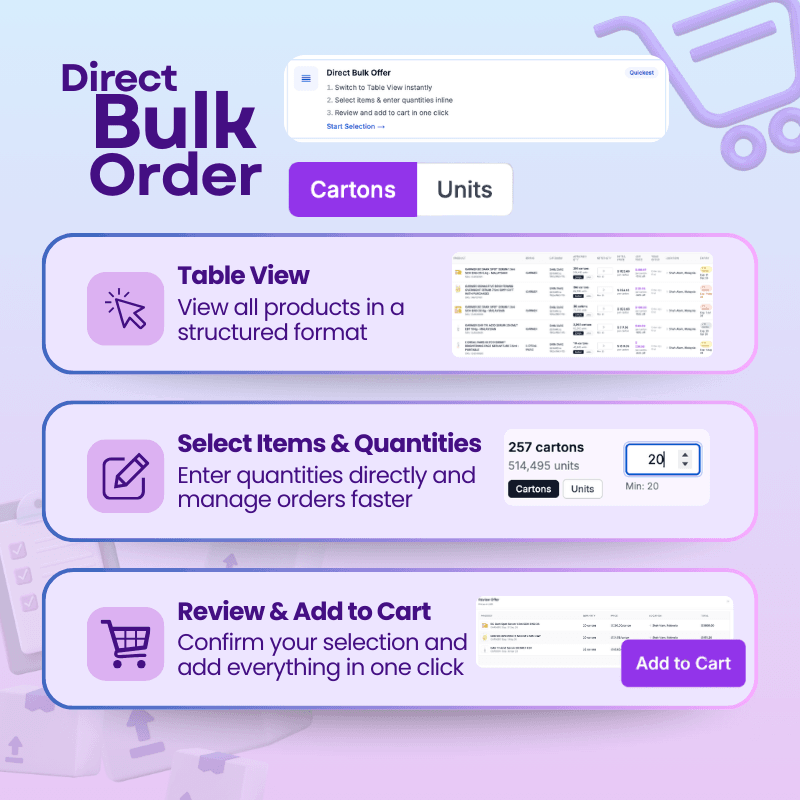
Steps to Use 'Direct Bulk Order' Option on Pollen Direct Marketplace
Option 1: Direct Bulk Order (Inside the Platform)
Ideal for quick and structured bulk buying.
Step 1: Switch to Table View
Use Table View to see all products in a structured, spreadsheet-style layout.
This format allows you to:
Compare multiple SKUs easily
Scan pricing and stock levels
Manage selections efficiently
Step 2: Select Items & Enter Quantities
Pollen Direct gives buyers flexibility to align purchases with their business model. Choose whether to purchase in:
Cartons
Units
Enter quantities directly inline. Minimum order quantities (MOQ) are displayed clearly to guide your purchase decisions. This helps you:
Adjust volumes instantly
Plan margins more accurately
Move faster across product selections
Step 3: Review & Add to Cart
After entering quantities:
Review your selections
Confirm product details
Add everything to cart in one click
No downloads required — just streamlined bulk purchasing directly within the marketplace.
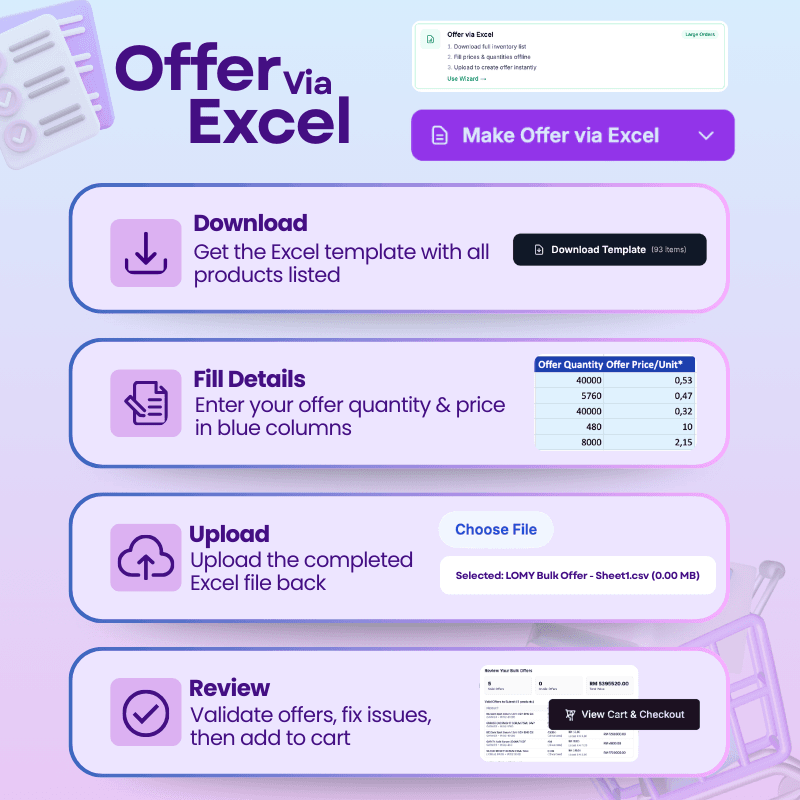
Steps to Use 'Offer via Excel' Option on Pollen Direct Marketplace
Option 2: Make an Offer via Excel
Best suited for large-volume or multi-SKU orders.
Step 1: Download the Excel Template
Download the full inventory template from the platform.
The template includes:
Complete product listings
Structured fields for offer quantity and price
Step 2: Fill in Offer Details
Enter your:
Desired quantities
Offer prices
Simply complete the highlighted columns in the file.
This method is ideal for:
Large distributors
Procurement teams
Multi-SKU negotiations
Step 3: Upload the Completed File
Upload your completed Excel file back into Pollen.
The system automatically validates:
Quantity accuracy
Pricing structure
Formatting compliance
Step 4: Review & Finalize
Once validated:
Review your offers
Fix any flagged issues
Add approved items to cart
You can then proceed to checkout seamlessly.
Who Should Use Each Method?
Direct Bulk Order
Faster checkout
Fewer SKUs
Immediate cart processing
Offer via Excel
Large volume transactions
Multiple SKUs
Structured negotiation workflows
Smarter Bulk Buying Starts Here
By combining structured views, inline editing, and Excel-based workflows, Pollen Direct removes friction from liquidation and secondary market purchasing.
Bulk buying becomes faster, more controlled and scalable.
Explore live inventory on Pollen Direct Marketplace and start placing your bulk offers today.